
KeePass Password Safe - der freies Passwortmanager ist nun in einer neuen Version erhältlich der V 2.61: Im Thread die Neuigkeiten, ergänzt durch die Praxisberichte, Tipps & Ideen 💡 rund um die Sicherheitsfragen - mit Workarounds und Plugin-Hinweisen, sowie Anregungen zum Einstieg und zur Einrichtung oder zu Backup-Strategien. 📀
Liebe PCMasters-Community, 🙂
gute Nachrichten von KeePass.🙂 Die Entwickler haben die Version 2.61.1 freigegeben. Mehr infos zu allen Neuerungen u. darüber hinaus auf der Entwicklerseite:
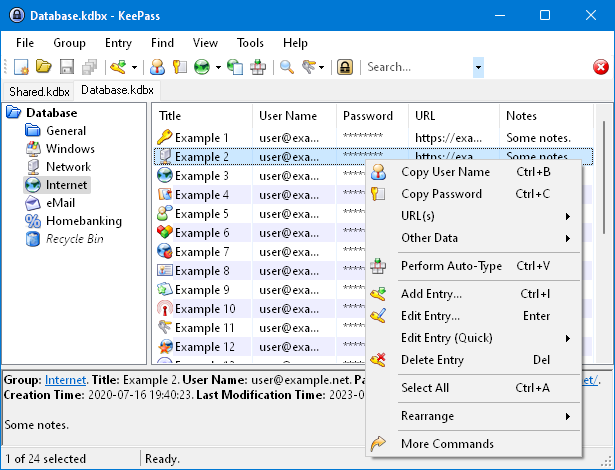
die Changes from 2.60 to 2.61: Neue Funktionen: (vgl. die Changelog)
Read More ::
The one-time password generator settings dialog now supports displaying settings of history entries.[/quote]
The Only KeePass Tutorial You'll Ever Need (Step-by-Step & Beginner Friendly)
Stats: 190 000 views :: 3600 likes :: 411 comments
weitere infos - Download - Hintergründe - Diskussion;
Keepass-Projektseite:
Diskussionen
Wikiseite über Keepass:
drei grundlegende Einführungen - "getting started with keepass":
How to Use KeePass: Step-by-Step Guide Published March 4, 2025:
KeePass: A beginners guide to Password Management:
Getting started with KeePass...
....und hier noch...ein interessanter Dialog: Where to store a Keepass password file? Where to store a Keepass password file?
vgl
Fragen: Wo speichert ihr eure KeePass-Datenbankdateien (und Schlüsseldateien)?
Es ist ja so: Im Grunde hat ja jede Speichermethode ihre Vor- und Nachteile, - hinsichtlich der Themen wie
Portabilität, Verlustrisiko, Zugriff auf die Daten oder auch der Synchronisierung. Last but not least wären dann ja auch noch die Kategorien wie "Backups" und auch "Komfort".
Also - interessant ist die Frage, wo ihr eure KeePass-Datenbankdateien und auch die Schlüsseldateien speichert? Vielen ist ja Sicherheit und (!) Komfort gleichermaßen wichtig.
Wie sind hier eure Vorgehensweisen, wie eure Erfahrungen! Welches Verfahren kommt für euch in Frage!?
Lokaler Speicher: Speichert ihr eure Datenbank und Schlüsseldateien auf eurem lokalen Computer?
Wenn ja, Trefft ihr hier auch noch Sicherheitsvorkehrungen?
Cloud-Speicher: Nutzt ihr Cloud-Speicherdienste?
Externe Datenträger: Speichert ihr eure Datenbank auf einem externen Speicher - also etwa auf einer externen Festplatte?
Teilt doch Eure Erfahrungen u. Ideen hier
Euch allen auf dem PCMasters-Forum- nun noch einen schöen Mittwoch 😉🙂
Liebe PCMasters-Community, 🙂
gute Nachrichten von KeePass.🙂 Die Entwickler haben die Version 2.61.1 freigegeben. Mehr infos zu allen Neuerungen u. darüber hinaus auf der Entwicklerseite:
Du hast keine Berechtigung, den Link zu sehen, bitte Anmelden oder Registrieren
Du hast keine Berechtigung, den Link zu sehen, bitte Anmelden oder Registrieren
die Changes from 2.60 to 2.61: Neue Funktionen: (vgl. die Changelog)
Read More ::
Du hast keine Berechtigung, den Link zu sehen, bitte Anmelden oder Registrieren
Added buttons in the one-time password generator settings dialog for copying the current one-time password to the clipboard.This is a stable release. It is recommended to upgrade from any previous 2.x version to 2.61.
KeePass 2.61 mainly features user interface and integration enhancements, and various other minor new features and improvements.
Hashes and signatures for integrity checking are available, and program binaries are digitally signed (Authenticode). New translations are available, too.
For a comparison of the current KeePass 1.43 and 2.61, see: Edition Comparison.
If you like KeePass, please don't forget to donate.
New features:
Added option 'Match diacritics' in the 'Find' dialog (turned off by default, i.e. the search is diacritic-insensitive).
If the option 'Check for update at KeePass startup' is activated, KeePass now initiates the check before trying to open a database (asynchronously); if an update is found while a master key prompt dialog is displayed, the availability of the update is indicated by a banner in the dialog.
When pasting a shared secret in the one-time password generator settings dialog, white-space characters are now removed automatically if the selected encoding is Base16/Hex, Base32 or Base64.
The one-time password generator settings dialog now supports displaying settings of history entries.[/quote]
The Only KeePass Tutorial You'll Ever Need (Step-by-Step & Beginner Friendly)
Stats: 190 000 views :: 3600 likes :: 411 comments
weitere infos - Download - Hintergründe - Diskussion;
Keepass-Projektseite:
Du hast keine Berechtigung, den Link zu sehen, bitte Anmelden oder Registrieren
Diskussionen
Du hast keine Berechtigung, den Link zu sehen, bitte Anmelden oder Registrieren
Wikiseite über Keepass:
Du hast keine Berechtigung, den Link zu sehen, bitte Anmelden oder Registrieren
drei grundlegende Einführungen - "getting started with keepass":
How to Use KeePass: Step-by-Step Guide Published March 4, 2025:
Du hast keine Berechtigung, den Link zu sehen, bitte Anmelden oder Registrieren
KeePass: A beginners guide to Password Management:
Du hast keine Berechtigung, den Link zu sehen, bitte Anmelden oder Registrieren
Getting started with KeePass...
Du hast keine Berechtigung, den Link zu sehen, bitte Anmelden oder Registrieren
....und hier noch...ein interessanter Dialog: Where to store a Keepass password file? Where to store a Keepass password file?
vgl
Du hast keine Berechtigung, den Link zu sehen, bitte Anmelden oder Registrieren
If you mean a KeePass password file, there are several arguments to decide where to store it. In my opinion, if the passwords are really, really important to you, you should make the decision based on:
a. The risk of the file being hacked
b. The risk of losing the file because of disk errors.
c. The risk of burglary / fire
Fragen: Wo speichert ihr eure KeePass-Datenbankdateien (und Schlüsseldateien)?
Es ist ja so: Im Grunde hat ja jede Speichermethode ihre Vor- und Nachteile, - hinsichtlich der Themen wie
Portabilität, Verlustrisiko, Zugriff auf die Daten oder auch der Synchronisierung. Last but not least wären dann ja auch noch die Kategorien wie "Backups" und auch "Komfort".
Also - interessant ist die Frage, wo ihr eure KeePass-Datenbankdateien und auch die Schlüsseldateien speichert? Vielen ist ja Sicherheit und (!) Komfort gleichermaßen wichtig.
Wie sind hier eure Vorgehensweisen, wie eure Erfahrungen! Welches Verfahren kommt für euch in Frage!?
Lokaler Speicher: Speichert ihr eure Datenbank und Schlüsseldateien auf eurem lokalen Computer?
Wenn ja, Trefft ihr hier auch noch Sicherheitsvorkehrungen?
Cloud-Speicher: Nutzt ihr Cloud-Speicherdienste?
Externe Datenträger: Speichert ihr eure Datenbank auf einem externen Speicher - also etwa auf einer externen Festplatte?
Teilt doch Eure Erfahrungen u. Ideen hier
Euch allen auf dem PCMasters-Forum- nun noch einen schöen Mittwoch 😉🙂
Zuletzt bearbeitet: